Internet video represents over of global internet bandwidth. When a user streams a 4K movie on Netflix, watches a live gaming tournament on Twitch, or scrolls through short-form video on TikTok, the underlying infrastructure must deliver continuous megabits per second of media data with sub-second startup times, zero playback freezing, and dynamic adaptation to fluctuating cellular reception.
Building video platforms requires mastering four core disciplines:
- Adaptive Bitrate Streaming Protocols (HLS / DASH)
- Distributed Chunked Transcoding Pipelines
- Multi-Tiered CDN Edge Caching & Origin Shields
- Client-Side Buffer-Based Adaptation (BBA)
1. Problem and Motivation
Delivering video at internet scale involves unique physical and economic constraints:
- Bandwidth Scale: Serving concurrent streams at requires sustaining () of continuous egress.
- Heterogeneous Client Devices: Clients range from 85-inch 4K Smart TVs connected via gigabit fiber to low-end smartphones on fluctuating 3G cellular connections with high packet loss.
- The Egress Cost Cliff: Standard cloud object storage (e.g. Amazon S3) charges approximately $0.08 per GB for internet egress. Sustaining () directly from origin storage at $0.08/GB costs ($4.32 million per day, or $129.6 million per month over 30 days) in bandwidth fees alone!
- Transcoding Compute Bottleneck: Encoding a 2-hour 4K raw ProRes video into multiple resolution profiles (AV1, HEVC, H.264) takes over 18 hours on a single 32-core server. To publish videos in minutes, transcoding must be split and executed across hundreds of parallel workers.
2. Mental Model & Architectural Pipeline
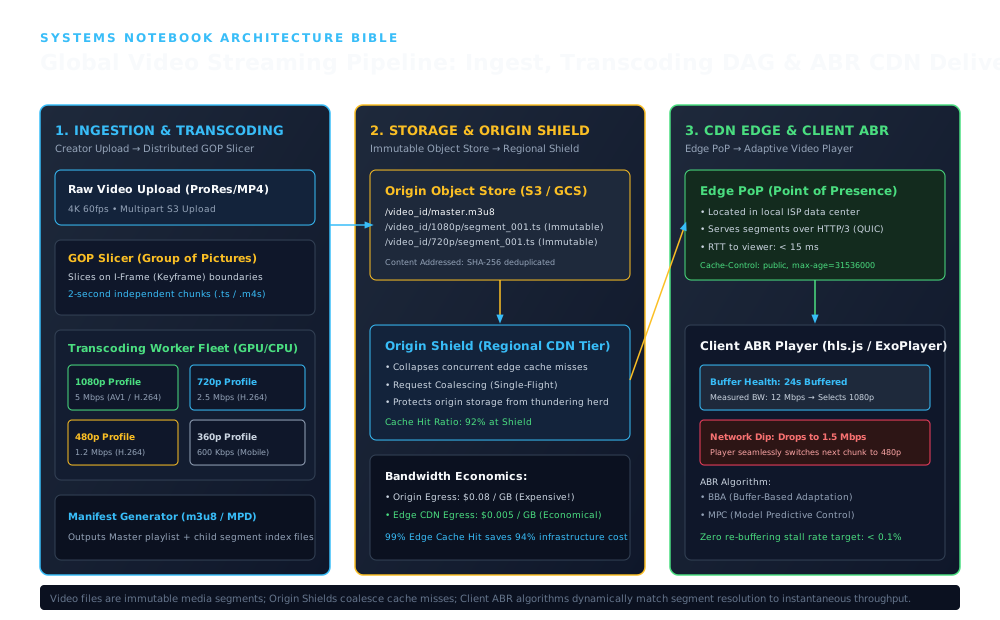
1. INGESTION & TRANSCODING & Raw Video Upload (ProRes/MP4)
Establishes the ingress and structural boundary across INGESTION & TRANSCODING & Raw Video Upload (ProRes/MP4): Creator Upload → Distributed GOP Slicer; 4K 60fps • Multipart S3 Upload; Slices on I-Frame (Keyframe) boundaries 2-second independent chunks (.ts / .m4s).
2. STORAGE & ORIGIN SHIELD & Origin Object Store (S3 / GCS)
Coordinates core data-plane execution and state transitions through STORAGE & ORIGIN SHIELD & Origin Object Store (S3 / GCS): Immutable Object Store → Regional Shield; /video_id/master.m3u8 /video_id/1080p/segment_001.ts (Immutable) /video_id/720p/segment_001.ts (Immutable); Content Addressed: SHA-256 deduplicated.
3. CDN EDGE & CLIENT ABR & Edge PoP (Point of Presence)
Enforces durability, state convergence, and output verification across CDN EDGE & CLIENT ABR & Edge PoP (Point of Presence): Edge PoP → Adaptive Video Player; Located in local ISP data center; Serves segments over HTTP/3 (QUIC).
[ Creator ] ──> Raw Video Upload (4K ProRes / MP4)
                      │
                      ▼
[ GOP Slicer ] ──> Splits on Keyframe (I-Frame) boundaries into 2-second chunks
                      │
                      ▼
[ Distributed Worker Fleet ] ──> Parallel transcoding into ABR Ladder (1080p, 720p, 480p, 360p)
                      │
                      ▼
[ Manifest Generator ] ──> Emits master.m3u8 and child index playlists
                      │
                      ▼
[ Origin Object Store (S3) ] ──> Stores immutable .ts / .m4s media chunks
                      │
                      ▼
[ Regional Origin Shield ] ──> Request coalescing; collapses concurrent edge misses
                      │
                      ▼
[ Edge CDN PoPs ] ──> Located in local ISP networks; caches chunks at the edge (99% Hit Ratio)
                      │
                      ▼
[ Client ABR Player ] ──> Dynamically requests chunks matching real-time buffer & throughput
3. Core Protocols: HLS and MPEG-DASH
Instead of maintaining expensive, stateful streaming connections (like legacy RTMP or RTSP), modern video streaming relies on HTTP chunked streaming.
3.1 HTTP Live Streaming (HLS)
Developed by Apple and standardized via RFC 8216, HLS uses text-based .m3u8 playlist files and media segment files (MPEG-2 Transport Stream .ts or Fragmented MP4 .m4s).
The Master Playlist (master.m3u8)
The master playlist lists available bitrate ladders, codecs, and resolutions:
#EXTM3U
#EXT-X-VERSION:6
#EXT-X-STREAM-INF:BANDWIDTH=5000000,RESOLUTION=1920x1080,CODECS="avc1.64002a,mp4a.40.2"
1080p/index.m3u8

#EXT-X-STREAM-INF:BANDWIDTH=2500000,RESOLUTION=1280x720,CODECS="avc1.4d401f,mp4a.40.2"
720p/index.m3u8

#EXT-X-STREAM-INF:BANDWIDTH=800000,RESOLUTION=640x360,CODECS="avc1.42e01e,mp4a.40.2"
360p/index.m3u8
The Child Media Playlist (1080p/index.m3u8)
The child playlist enumerates individual, immutable media segments:
#EXTM3U
#EXT-X-VERSION:6
#EXT-X-TARGETDURATION:4
#EXT-X-MEDIA-SEQUENCE:0

#EXTINF:4.000,
segment_000.ts
#EXTINF:4.000,
segment_001.ts
#EXTINF:4.000,
segment_002.ts
#EXT-X-ENDLIST
4. Distributed Transcoding Engine
A video cannot be transcoded as a monolithic file if fast turnaround is required. Video encoders rely on the Group of Pictures (GOP) structure:
- I-Frame (Intra-coded): A complete, independent still image. Contains zero references to other frames.
- P-Frame (Predicted): Stores only changes relative to the prior frame.
- B-Frame (Bi-directional): Stores changes relative to both preceding and succeeding frames.
Slicing on Closed GOP Boundaries
The ingest coordinator inspects the video container and slices the stream strictly on closed I-frames (keyframes). Because every 2-second or 4-second GOP segment is completely self-contained, a 2-hour movie can be sliced into independent chunks.
A distributed task queue (e.g. Celery, Temporal, or AWS SQS) distributes the chunk encoding tasks across a fleet of GPU worker instances, finishing full multi-profile transcoding in less than 2 minutes.
5. Mathematical Foundations & ABR Algorithm
5.1 Buffer-Based Adaptation (BBA) Algorithm
Traditional ABR estimated network throughput by measuring download time of past chunks:
However, throughput on cellular networks fluctuates wildly, causing players to oscillate rapidly between 1080p and 360p (the “bitrate oscillation” defect).
Modern players (such as Netflix’s BBA) select bitrates based primarily on Client Buffer Occupancy (): Let be the current duration (in seconds) of unplayed video buffered in player memory:
- Reservoir (): Buffer is dangerously low (). The player forces the lowest possible bitrate () to prioritize uninterrupted playback over image quality.
- Cushion (): The player maps buffer occupancy linearly to the bitrate ladder:
- Upper Reservoir (): Buffer is plentiful (). The player safely locks to the highest available quality ( / 4K).
Selected Bitrate
      ▲
Max   │                                ┌──────────────────
      │                               /
      │                              /  Linear Cushion Zone
      │                             /
Min   │ ───────────────────────────┘
      └────────────┬───────────────┬───────────────────────►
                   r (Reservoir)   r + c (Upper Buffer)      Buffer Occupancy (s)
6. Production TypeScript Simulation: Client ABR Player Engine
Below is an executable simulation of a Buffer-Based Adaptive Bitrate Player:
export interface VideoProfile {
  resolution: string;
  bitrateBps: number;
  uriPrefix: string;
}

export class AdaptiveVideoPlayer {
  public bufferSeconds = 0;
  private readonly maxBufferSeconds = 30;
  private readonly reservoirSeconds = 6;
  private readonly cushionSeconds = 18;

  constructor(
    public readonly profiles: VideoProfile[], // Sorted from lowest to highest bitrate
    public readonly chunkDurationSeconds: number = 4
  ) {
    this.profiles.sort((a, b) => a.bitrateBps - b.bitrateBps);
  }

  /**
   * Evaluates buffer health and selects the optimal video profile for the next chunk
   */
  public selectNextProfile(measuredBandwidthBps: number): VideoProfile {
    // 1. Critical Reservoir Zone: Buffer is dangerously low -> Force Lowest Bitrate
    if (this.bufferSeconds <= this.reservoirSeconds) {
      return this.profiles[0];
    }

    // 2. Upper Cushion Zone: Buffer is plentiful -> Highest Bitrate
    if (this.bufferSeconds >= this.reservoirSeconds + this.cushionSeconds) {
      // Pick highest bitrate that fits within measured network bandwidth
      for (let i = this.profiles.length - 1; i >= 0; i--) {
        if (this.profiles[i].bitrateBps <= measuredBandwidthBps * 0.85) {
          return this.profiles[i];
        }
      }
      return this.profiles[0];
    }

    // 3. Linear Cushion Scaling
    const cushionRatio =
      (this.bufferSeconds - this.reservoirSeconds) / this.cushionSeconds;
    const targetBitrate =
      this.profiles[0].bitrateBps +
      cushionRatio * (this.profiles[this.profiles.length - 1].bitrateBps - this.profiles[0].bitrateBps);

    // Pick profile closest to targetBitrate without exceeding network capacity
    let selected = this.profiles[0];
    for (const p of this.profiles) {
      if (p.bitrateBps <= targetBitrate && p.bitrateBps <= measuredBandwidthBps * 0.90) {
        selected = p;
      }
    }

    return selected;
  }

  /**
   * Simulates downloading a chunk and updating buffer state
   */
  public simulateChunkDownload(
    selectedProfile: VideoProfile,
    actualNetworkBps: number
  ): { downloadTimeSec: number; rebuffered: boolean } {
    const chunkBytes = (selectedProfile.bitrateBps * this.chunkDurationSeconds) / 8;
    const downloadTimeSec = (chunkBytes * 8) / actualNetworkBps;

    // During download, playback consumes buffer
    const bufferDrain = downloadTimeSec;
    let rebuffered = false;

    if (this.bufferSeconds < bufferDrain) {
      rebuffered = true; // Video stalled!
      this.bufferSeconds = this.chunkDurationSeconds;
    } else {
      this.bufferSeconds = this.bufferSeconds - bufferDrain + this.chunkDurationSeconds;
    }

    this.bufferSeconds = Math.min(this.bufferSeconds, this.maxBufferSeconds);

    return { downloadTimeSec, rebuffered };
  }
}

function runDemo(): void {
  console.log('=== Adaptive Bitrate Video Streaming Architecture (HLS / DASH) ===');
  const profiles: VideoProfile[] = [
    { resolution: '360p', bitrateBps: 800_000, uriPrefix: '360p/segment_' },
    { resolution: '720p', bitrateBps: 2_500_000, uriPrefix: '720p/segment_' },
    { resolution: '1080p', bitrateBps: 5_000_000, uriPrefix: '1080p/segment_' },
  ];
  const player = new AdaptiveVideoPlayer(profiles, 4);
  for (let chunkIdx = 0; chunkIdx < 5; chunkIdx++) {
    const sel = player.selectNextProfile(4_000_000);
    const dl = player.simulateChunkDownload(sel, 4_000_000);
    console.log(
      `Chunk ${chunkIdx}: resolution=${sel.resolution} (${sel.uriPrefix}${chunkIdx}.ts), download=${dl.downloadTimeSec.toFixed(2)}s, buffer=${player.bufferSeconds.toFixed(1)}s`
    );
  }
}
runDemo();
7. Real-World Open-Source Implementation Analysis
A. FFmpeg Transcoding Pipeline
FFmpeg is the industry standard for media processing. A production multi-bitrate HLS packaging command:
ffmpeg -i input_4k.mov \
  -filter_complex \
  "[0:v]split=3[v1],[v2],[v3]; \
   [v1]scale=w=1920:h=1080[v1out]; \
   [v2]scale=w=1280:h=720[v2out]; \
   [v3]scale=w=640:h=360[v3out]" \
  -map "[v1out]" -c:v:0 libx264 -b:v:0 5000k -g 48 -keyint_min 48 -sc_threshold 0 \
  -map "[v2out]" -c:v:1 libx264 -b:v:1 2500k -g 48 -keyint_min 48 -sc_threshold 0 \
  -map "[v3out]" -c:v:2 libx264 -b:v:2 800k  -g 48 -keyint_min 48 -sc_threshold 0 \
  -f hls -hls_time 4 -hls_playlist_type vod \
  -master_pl_name master.m3u8 \
  -hls_segment_filename "stream_%v/data%03d.ts" stream_%v.m3u8
Key flags:
-g 48 -keyint_min 48: Forces a closed keyframe exactly every 48 frames (2 seconds at 24fps), ensuring all segments align perfectly for seamless bitrate switching.-hls_time 4: Emits 4-second chunk files.
8. Failure Modes & Operational War Stories
War Story: The Super Bowl Thundering Herd Outage
- Incident: During live streaming of a major sporting event, the origin S3 bucket collapsed under , causing widespread streaming blackouts.
- Root Cause: A newly uploaded 4-second live segment was requested by 2 million viewers at the exact same sub-second instant. Because the chunk was brand new, the edge CDN PoPs had not cached it yet. All edge PoPs forwarded the cache miss directly to origin S3, crashing storage throughput.
- Mitigation:
- Origin Shield Tier: Introduced regional origin shields between edge PoPs and S3.
- Single-Flight Request Coalescing: When 5,000 edge PoPs ask the origin shield for
segment_104.ts, the shield holds 4,999 requests open, makes a single GET request to S3, and broadcasts the byte response to all 5,000 waiting clients. Origin load dropped from to 1 QPS per segment.
9. Operational Decision Guide
| System Goal | Recommended Protocol / Configuration | Rationale |
|---|---|---|
| General VOD (Movies, TV Shows) | HLS with 4-to-6 second segments | High CDN cacheability; optimal compression efficiency. |
| Low-Latency Live Streaming (Sports) | LL-HLS or Chunked CMAF (1-second chunks) | Achieves 2-to-3 second glass-to-glass latency over HTTP. |
| Ultra-low latency interactive (Twitch Chat / Zoom) | WebRTC (UDP / SRTP) | Sub-second latency; bypasses HTTP chunking entirely. |
10. Hands-on Operational Drills
- Verify ABR Buffer Protection: Run
AdaptiveVideoPlayerwith 3 profiles: 1080p (5 Mbps), 720p (2.5 Mbps), 360p (800 Kbps). Simulate a sudden network drop from 10 Mbps down to 1 Mbps. Verify that the player smoothly downgrades to 360p before the buffer hits 0 seconds, avoiding playback stall. - Calculate Video Delivery Bandwidth: A platform has concurrent viewers watching a 1080p stream (4 Mbps). Calculate total egress bandwidth and daily data volume.
- .
- .
View Reference Architecture & Worked Solutions (APP-A09-001)
1. Reference Solution — Drill 1: Verify ABR Buffer Protection Under Network Drop
- Step-by-Step Buffer Trajectory (10 Mbps 1 Mbps Cellular Drop):
- Phase A (Steady State at ): After downloading 8 segments ( each), the client buffer reaches (, upper cushion).
selectNextProfile(10_000_000)selects1080p(), and each segment downloads in while adding of media, keeping pinned nearmaxBufferSeconds = 30.0s. - Phase B (Abrupt Drop to During In-Flight
1080pSegment):- If an already-requested
1080psegment () experiences the drop to , it takes to finish downloading, draining the buffer from to (zero stall because the buffer absorbed the transfer!).
- If an already-requested
- Phase C (BBA Step-Down Before Reservoir Exhaustion):
- On the next segment decision,
measuredBandwidthBps = 1_000_000. InselectNextProfile(1_000_000), the bandwidth guardp.bitrateBps <= measuredBandwidthBps * 0.90() immediately filters out1080p() and720p(), stepping down to360p(). - At
360p( per segment) over a link, each segment downloads in while replenishing of playback ( per chunk), sorebufferedremainsfalseand the buffer recovers cleanly without ever hitting .
- On the next segment decision,
- Phase A (Steady State at ): After downloading 8 segments ( each), the client buffer reaches (, upper cushion).
2. Reference Solution — Drill 2: Video Delivery Bandwidth, Volume & Origin Shield Offload
- Step 1 (Aggregate Edge Egress Bandwidth):
- Step 2 (Total Daily Data Volume):
- Step 3 (Origin S3 Load With Multi-Tier CDN & Single-Flight Origin Shield):
- With a Edge PoP cache hit ratio and an Origin Shield hit ratio across Edge PoPs, origin egress drops to (or just 1 single stream per live channel when all viewers watch the same live broadcast via Single-Flight coalescing!).
11. Design Alternatives & Video Streaming Trade-offs
| Streaming Protocol | Latency Target | Transport Protocol | CDN Cacheability | Primary Use Case |
|---|---|---|---|---|
| Standard HLS / DASH | 6 - 30 seconds | HTTP/TCP | Maximum (Standard web caches) | VOD, large-scale live sports broadcast |
| Low-Latency HLS (LL-HLS) | 1 - 3 seconds | HTTP/2 or HTTP/3 | High (Chunked transfer encoding) | Interactive live streaming, e-sports |
| WebRTC | Sub-500 milliseconds | UDP / SRTP | None (Peer-to-peer / SFU required) | Video conferencing, live auctions |
| RTMP (Legacy Ingest) | 2 - 5 seconds | TCP | Poor (Requires media gateway) | Studio encoder contribution to ingestion servers |
12. Authoritative References & Streaming Standards
- Apple Inc. (2020), “HTTP Live Streaming (HLS) RFC 8216” — datatracker.ietf.org/doc/html/rfc8216
- Te-Yuan Huang et al. (2015), “A Buffer-Based Approach to Rate Adaptation: Evidence from a Large Video Streaming Service”, ACM SIGCOMM — doi.org/10.1145/2619282.2619288
- Netflix Technology Blog (2018), “Dynamic Optimizer: A Per-Title and Per-Shot Video Encoding Engine” — netflixtechblog.com
- Version Context: Standards reflect HLS RFC 8216bis and ISO/IEC 23009-1 DASH with CMAF low-latency chunking.