1. The Problem & Why It Matters
In batch processing systems (Hadoop MapReduce, traditional SQL ETLs), data is processed in static, bounded chunks. An hourly cron job queries yesterday’s database records and outputs summary reports.
Modern engineering requirements demand real-time intelligence:
- Fraud Detection: A stolen credit card used in New York and London within 10 minutes must trigger an instant card freeze, not an alert during tomorrow’s batch report.
- Dynamic Pricing & Ad Bidding: Ride-hailing surges and real-time ad placements must react within milliseconds to live supply and demand signals.
However, building real-time stateful stream pipelines is notoriously difficult:
- Network delays and offline mode: Mobile devices lose signal in subways. Sensor packets queue behind congested cellular towers. Events arrive out of order, delayed by seconds, minutes, or days.
- Clock Skew: System clocks on millions of client devices diverge by seconds or minutes.
- Stream Unboundedness: A stream has no “end”. How do you compute a group-by or average on an infinite sequence of records?
Solving these challenges requires moving from Processing Time to Event Time, governed by Watermarks and Windowing Topologies.
2. Intuitive Mental Model
Imagine a teacher grading homework assignments from students:
- Processing Time: The teacher grades whichever papers happen to be sitting on the physical desk at 5:00 PM. If a student wrote their essay on Tuesday but the postal carrier delivered it at 5:05 PM, the student gets a zero.
- Event Time: The teacher checks the postmark date stamped on the envelope. An essay written on Tuesday is counted towards Tuesday’s grades regardless of when the mail carrier delivers it.
- The Watermark: The teacher cannot wait forever for missing letters. The teacher declares a rule: “When the post office delivers a letter postmarked Thursday, I will wait 1 extra day (), then declare Wednesday’s grading closed.” The watermark is the clock that advances based on the latest postmark seen minus the allowed lateness buffer.
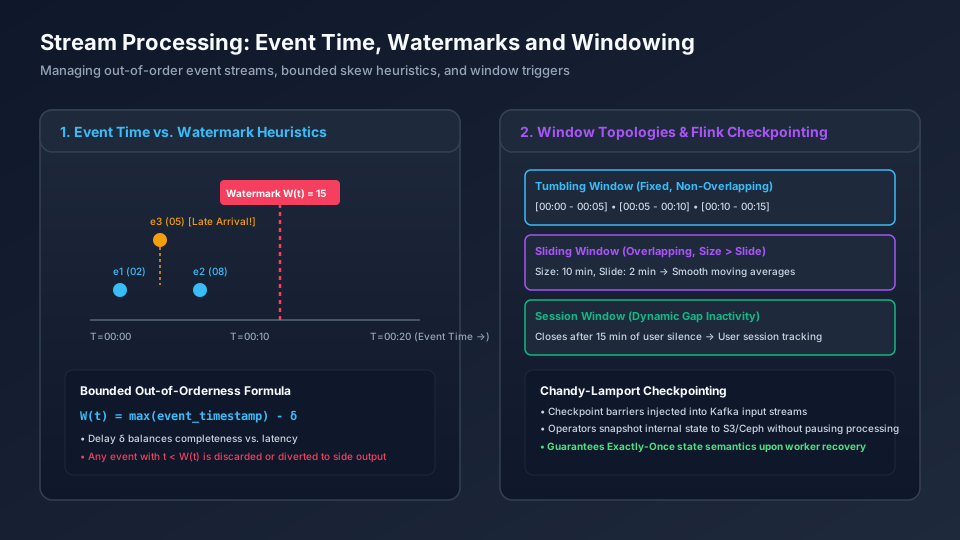
1. Watermark W(t) = 15 & Bounded Out-of-Orderness Formula
Establishes the ingress and structural boundary across Watermark W(t) = 15 & Bounded Out-of-Orderness Formula: W(t) = max(event_timestamp) - δ; Delay δ balances completeness vs. latency; Any event with t < W(t) is discarded or diverted to side output.
2. Tumbling Window (Fixed, Non-Overlapping) & Sliding Window (Overlapping, Size > Slide)
Coordinates core data-plane execution and state transitions through Tumbling Window (Fixed, Non-Overlapping) & Sliding Window (Overlapping, Size > Slide): [00:00 - 00:05] • [00:05 - 00:10] • [00:10 - 00:15]; Size: 10 min, Slide: 2 min → Smooth moving averages; Closes after 15 min of user silence → User session tracking.
3. Tumbling Window (Fixed, Non-Overlapping) & Sliding Window (Overlapping, Size > Slide)
Enforces durability, state convergence, and output verification across Tumbling Window (Fixed, Non-Overlapping) & Sliding Window (Overlapping, Size > Slide): [00:00 - 00:05] • [00:05 - 00:10] • [00:10 - 00:15]; Size: 10 min, Slide: 2 min → Smooth moving averages; Closes after 15 min of user silence → User session tracking.
3. Architectural Mechanisms & Concrete Topologies
3.1 The Three Notions of Time
- Event Time (): The epoch millisecond timestamp generated when the user action or hardware sensor reading occurred on the client device.
- Ingestion Time (): The timestamp recorded when the event is appended to the persistent Kafka commit log partition by the broker.
- Processing Time (): The local wall-clock timestamp of the stream worker node CPU at the moment the record is processed in memory.
3.2 Window Topologies
Because a stream never terminates, aggregations (count, sum, average) must operate over finite temporal windows:
- Tumbling Window (Fixed): Disjoint, non-overlapping windows of fixed duration . Each event belongs to exactly one window:
- Sliding Window (Hopping): Windows of duration advancing by slide interval (where ). Each event belongs to windows:
- Session Window: Dynamic windows demarcated by periods of user inactivity (gap parameter ). If no event arrives for minutes, the session window closes.
4. Formal Mathematical Derivations
4.1 Bounded-Out-Of-Orderness Watermark Formula
Let the stream engine observe an incoming event stream where each event carries timestamp . Let be the maximum event timestamp observed up to arrival :
Given an allowed lateness threshold (the bounded out-of-orderness tolerance), the watermark emitted into the stream is monotonically non-decreasing:
Window Trigger Condition: A window is eligible for evaluation and emission if and only if:
Lateness Penalty: Any event arriving with timestamp is classified as a Late Event:
- In standard mode: The late event is discarded.
- In side-output mode: The late event is routed to an alternate dead-letter stream for reconciliation.
5. Edge Cases, Failure Modes & Distributed Anomalies
5.1 Idle Partition Watermark Stalling
In Apache Flink or Kafka Streams, an operator merges watermarks from parallel topic partitions:
The Failure: If Partition 3 becomes completely idle (no incoming traffic), its watermark ceases to advance. Because Flink takes the minimum across all upstream partitions, the entire application’s event-time clock freezes! All windows cease evaluating.
The Fix: Flink’s WatermarkStrategy.withIdleness(Duration.ofSeconds(10)). If a partition generates no events for 10 seconds, it is marked as idle and excluded from the minimum watermark calculation.
5.2 Out-of-Memory from Unbounded Session Windows
If a user generates clicks continuously without ever pausing for longer than the gap parameter , the session window never closes. The stream engine accumulates millions of events in memory or local RocksDB, eventually causing memory exhaustion or massive disk write amplification. Production systems configure an emergency maximum window duration ceiling (e.g. 24 hours).
6. Open-Source Architectural Studies
6.1 Apache Flink: Chandy-Lamport Barrier Checkpointing
Flink achieves high-throughput, fault-tolerant exactly-once state processing through Asynchronous Barrier Snapshotting (ABS):
- The JobManager periodically injects a numbered Checkpoint Barrier () into all stream sources.
- Barriers travel through the operator DAG alongside regular data records.
- When an operator receives barrier from all input channels (barrier alignment), it writes a point-in-time snapshot of its local state (stored in embedded RocksDB) to durable distributed storage (Amazon S3 / Ceph).
- If a worker node crashes, all operators reload their state from the latest completed checkpoint (), and Kafka resets its consumer partition offsets back to the positions recorded in .
7. Production Incident Post-Mortem (War Stories)
The Ad-Tech Billing Clock Glitch
Context: An ad-tech platform computed real-time click billing for pay-per-click advertisers using a 5-minute tumbling window on Processing Time. The Failure: An AWS data center power glitch caused network packet retransmission across several availability zones. Click events queued inside Kafka for 45 minutes before being delivered in a massive rush. The Impact: The stream workers processed 45 minutes of accumulated clicks inside a single 5-minute processing-time window. Advertisers with daily budgets of $500 were billed $12,000 within 5 minutes, triggering emergency budget-exhaustion account suspensions and customer cancellations. The Fix: Migrated to Event Time with 15-minute Bounded Watermarks. During network hiccups, delayed clicks were mapped to their true historical event-time windows, respecting hourly advertiser budget limits perfectly.
8. Production-Grade TypeScript Simulation: Event-Time Engine & Tumbling Window
This simulation models out-of-order event arrivals, bounded-out-of-orderness watermark generation, and window evaluation.
/**
 * Production Stream Processing Simulation: Event Time, Watermarks & Tumbling Windows
 */

export interface StreamEvent {
  id: string;
  eventTime: number; // Epoch milliseconds
  value: number;
}

export interface WindowResult {
  windowStart: number;
  windowEnd: number;
  sum: number;
  eventCount: number;
}

export class EventTimeStreamProcessor {
  private readonly windowDurationMs: number;
  private readonly allowedLatenessMs: number;
  private maxObservedTimestamp = 0;
  private currentWatermark = 0;

  // Window Key (windowStart) -> Accumulated State
  private activeWindows = new Map<number, { sum: number; count: number }>();
  public completedWindows: WindowResult[] = [];
  public discardedLateEvents: StreamEvent[] = [];

  constructor(windowDurationMs: number, allowedLatenessMs: number) {
    this.windowDurationMs = windowDurationMs;
    this.allowedLatenessMs = allowedLatenessMs;
  }

  public processEvent(event: StreamEvent): void {
    // 1. Advance observed event time
    if (event.eventTime > this.maxObservedTimestamp) {
      this.maxObservedTimestamp = event.eventTime;
    }

    // 2. Compute current watermark: max(t) - allowedLateness
    const newWatermark = Math.max(0, this.maxObservedTimestamp - this.allowedLatenessMs);
    if (newWatermark > this.currentWatermark) {
      this.currentWatermark = newWatermark;
      this.triggerEligibleWindows();
    }

    // 3. Assign to Tumbling Window: start = t - (t % duration)
    const windowStart = event.eventTime - (event.eventTime % this.windowDurationMs);
    const windowEnd = windowStart + this.windowDurationMs;

    // 4. Reject if target window has already closed and emitted (windowEnd <= currentWatermark)
    if (windowEnd <= this.currentWatermark) {
      this.discardedLateEvents.push(event);
      return;
    }

    const state = this.activeWindows.get(windowStart) ?? { sum: 0, count: 0 };
    state.sum += event.value;
    state.count++;
    this.activeWindows.set(windowStart, state);
  }

  private triggerEligibleWindows(): void {
    for (const [windowStart, state] of this.activeWindows.entries()) {
      const windowEnd = windowStart + this.windowDurationMs;
      // If watermark has passed the window boundary, evaluate and close
      if (this.currentWatermark >= windowEnd) {
        this.completedWindows.push({
          windowStart,
          windowEnd,
          sum: state.sum,
          eventCount: state.count,
        });
        this.activeWindows.delete(windowStart);
      }
    }
  }

  public getWatermark(): number {
    return this.currentWatermark;
  }
}

// Verification Routine
export function runStreamProcessingSimulation() {
  console.log("=== Event-Time Watermark & Tumbling Window Simulation ===");

  const WINDOW_DURATION = 10000; // 10-second windows
  const ALLOWED_LATENESS = 3000; // 3-second out-of-order tolerance
  const engine = new EventTimeStreamProcessor(WINDOW_DURATION, ALLOWED_LATENESS);

  // Simulated events: [timestamp_ms, value]
  const inputEvents: [number, number][] = [
    [1000, 10], // Window 0-10000
    [3000, 20], // Window 0-10000
    [2000, 15], // Out-of-order! Window 0-10000
    [12000, 50], // Window 10000-20000 -> Watermark advances to 12000 - 3000 = 9000
    [7000, 25], // Late arrival but within watermark (window [0, 10000) is still open since watermark 9000 < 10000)
    [15000, 100], // Window 10000-20000 -> Watermark advances to 15000 - 3000 = 12000 -> Closes Window 0-10000!
    [4000, 999], // Very late arrival: 4000 < Watermark (12000) -> DISCARDED!
  ];

  for (let i = 0; i < inputEvents.length; i++) {
    const [t, val] = inputEvents[i];
    engine.processEvent({ id: `e_${i}`, eventTime: t, value: val });
  }

  console.log(`Current Watermark: ${engine.getWatermark()}ms`);
  console.log(`Completed Windows: ${engine.completedWindows.length}`);
  for (const w of engine.completedWindows) {
    console.log(
      `Window [${w.windowStart} - ${w.windowEnd}]: Sum = ${w.sum}, Count = ${w.eventCount}`
    );
  }
  console.log(`Discarded Late Events: ${engine.discardedLateEvents.length}`);
}

runStreamProcessingSimulation();
9. Operational Checklist, Failure Runbooks & Window Tuning
Watermark Tuning Rules
When choosing the allowed lateness :
- Low Latency Requirement (Dashboards, Live Monitoring):
- Set . Windows trigger quickly, but 1%–2% of delayed mobile events will be dropped.
- High Precision Financial / Billing Requirement:
- Set . Configure Side Outputs for late events:
OutputTag<OrderEvent> lateDataTag = new OutputTag<OrderEvent>("late-orders"){};
DataStream<WindowResult> result = stream
    .keyBy(OrderEvent::getUserId)
    .window(TumblingEventTimeWindows.of(Time.minutes(5)))
    .sideOutputLateData(lateDataTag)
    .aggregate(new OrderAggregator());
10. Guided Applied System Design Exercises & Debugging Drills
Drill 1: The Frozen Watermark Investigation
Your Flink pipeline consumes from a Kafka topic with 16 partitions. Suddenly, no window results are emitted for 30 minutes, even though 15 partitions have high throughput.
- Explain how a single inactive Kafka partition can cause Flink’s event-time clock to freeze.
- How does configuring
withIdleness()solve this issue without dropping data?
Drill 2: Session Window Re-evaluation
A ride-hailing company defines a user ride booking session as events with inactivity gap . An app client disconnects for 14 minutes, then sends a GPS ping, then disconnects for 20 minutes.
- Trace the opening, extending, and closing of the session window.
- Compare the memory storage cost of maintaining session windows in RocksDB vs. fixed tumbling windows.
View Reference Architecture & Worked Solutions (CORE-M15-001)
1. Worked Solution — Drill 1: Diagnosing & Fixing the Frozen Multi-Partition Watermark
-
Why a Single Idle Kafka Partition Freezes the Entire Flink Pipeline:
- In Apache Flink, a windowed operator receiving streams from upstream Kafka partitions tracks a separate channel watermark for each partition and advances the operator’s effective event-time clock to the minimum across all active input channels:
- This minimum rule is required for correctness: if Partition 7 is temporarily lagging at
10:00:00while Partitions 0–6 and 8–15 have reached10:30:00, advancing the operator watermark past10:00:00would prematurely close windows before Partition 7’s10:01:00events arrive. - However, if Partition 7 is completely idle (e.g., a sparse regional shard or skewed partition key with zero new events), no new records arrive on Partition 7 to advance (or ). Consequently, remains permanently frozen, and no window across any of the 16 partitions can ever satisfy !
-
How
WatermarkStrategy.withIdleness()Restores Progress Without Dropping Data:WatermarkStrategy<OrderEvent> strategy = WatermarkStrategy .<OrderEvent>forBoundedOutOfOrderness(Duration.ofSeconds(10)) .withTimestampAssigner((event, ts) -> event.getEventTimeMs()) .withIdleness(Duration.ofSeconds(30));- When Partition 7 emits zero records for of processing time, the source subtask marks channel 7 as
IDLEand broadcasts anIdleStatusmarker downstream. - Downstream window operators temporarily exclude
IDLEchannels from the calculation, allowing to advance smoothly at the pace of the 15 active partitions. As soon as a new event arrives on Partition 7, channel 7 automatically transitions back toACTIVEand rejoins the watermark minimum.
- When Partition 7 emits zero records for of processing time, the source subtask marks channel 7 as
2. Worked Solution — Drill 2: Session Window Lifecycle & RocksDB State Cost Analysis
-
Step-by-Step Session Window Trace ( Inactivity Gap):
- Suppose the user emits Event at . Flink creates an initial singleton session window covering .
- After disconnecting for ( gap), the user emits a GPS ping at .
- creates candidate window .
- Because (), Flink merges the two intervals into a single extended session window and combines their accumulators.
- The user then disconnects for ( gap) until .
- As the watermark advances past , Flink closes and emits the first session window (total session duration: active span + trailing gap).
- Event at opens a brand-new, separate session window .
-
RocksDB State Memory & I/O Cost: Session Windows vs. Tumbling Windows:
- Tumbling Windows (
MergingWindowSetnot needed): Every key maps to a deterministic, pre-known(key, windowStart)composite key in RocksDB. Each arriving event executes a single pointRocksDB.get()+RocksDB.put()(orRocksDB.merge()), and the timer service tracks exactly 1 firing timestamp per active key. - Session Windows (Dynamic Interval Merging): Because an out-of-order event can bridge two previously separate session windows (e.g., an event at
12:12bridging and ), Flink must maintain a per-keyMergingWindowSetin RocksDB, iterate over existing window intervals for that key, delete the superseded window state entries (RocksDB.delete()), and write the merged window entry—incurring higher RocksDB read/write amplification and tombstone churn than fixed tumbling windows.
- Tumbling Windows (
11. Design Alternatives & Stream Windowing Trade-Off Matrix
| Window Type | Boundary Overlap | State Memory Footprint | Late Data Tolerance | Best Architectural Fit |
|---|---|---|---|---|
| Tumbling Window | Disjoint (Zero overlap) | Minimal (1 window state per key) | Discard or Side Output | Periodic aggregations, hourly financial summaries |
| Sliding Window | Overlapping ( concurrent) | High (Multiplied by overlap factor) | Incremental window updates | Moving averages, sliding rate limiters, trend detection |
| Session Window | Dynamic gap-based | Variable (Depends on inactivity gap) | Merges adjacent sessions on late arrival | User interaction tracking, website clickstream sessions |
| Continuous Global Window | Unbounded | Requires explicit custom eviction triggers | Complete state retention | Lifetime counters, persistent machine learning feature vectors |
12. Authoritative References & Version Context
- Tyler Akidau et al. (2015), “The Dataflow Model: A Practical Approach to Balancing Correctness, Latency, and Cost in Massive-Scale, Unbounded, Out-of-Order Data Processing”, VLDB ‘15 — doi.org/10.14778/2824032.2824076
- Paris Carbone et al. (2015), “Apache Flink: Stream and Batch Processing in a Single Engine”, IEEE Data Engineering Bulletin 38(4) — data-artisans.com
- Apache Flink 1.18/1.19 Official Documentation — Timestamps and Watermark Generation — nightlies.apache.org/flink/flink-docs-master/docs/dev/datastream/event-time/generating_watermarks/
- Version Context: Watermark invariants follow Google Cloud Dataflow / Apache Beam standards and Apache Flink 1.18+ / 2.0 streaming runtime architectures.