1. The Problem & Why It Matters
Every database engineer and systems architect must answer a fundamental question: When does a write become durable?
Many engineers assume that once a write() system call returns successfully, the data is permanently etched into disk silicon. This assumption is catastrophically false. On modern operating systems:
write()merely copies bytes into the operating system’s volatile memory—the Linux Page Cache. If power is severed 10 milliseconds later, all written data vanishes without a trace.- Forcing persistence via
fsync()incurs a severe performance penalty: while a cachedwrite()takes , anfsync()on a consumer SSD can stall the calling thread for ( slower). - Modern Solid State Drives (SSDs) are not uniform block devices. Because flash cells cannot be overwritten without erasing an entire multi-megabyte block, random updates trigger internal Garbage Collection (GC), causing Write Amplification (WAF) that destroys SSD write throughput and burns through drive endurance.
Understanding storage media internals is essential for designing high-throughput databases, tuning write-ahead logging (WAL), and preventing silent data corruption.
2. Intuitive Mental Model
Imagine writing a book using ink on paper vs. carving hieroglyphs into stone:
- The Page Cache is a scratchpad notebook on your desk. Writing a word with a pencil takes 1 second. You can jot down hundreds of notes quickly, but if a fire breaks out in the room, the scratchpad turns to ash.
fsync()is walking outside to a granite boulder and chiseling the notes into stone. It takes 10 minutes per word, but a fire in the room leaves the stone intact.- NAND Flash Erase Blocks are like stone tablets where you can only write words, but erasing an error requires dynamite that blasts the entire tablet to dust. If you want to change one word on page 5, the SSD controller must copy pages 1–4 and 6–10 to a brand-new tablet, erase the old tablet with dynamite, and write the updated page.
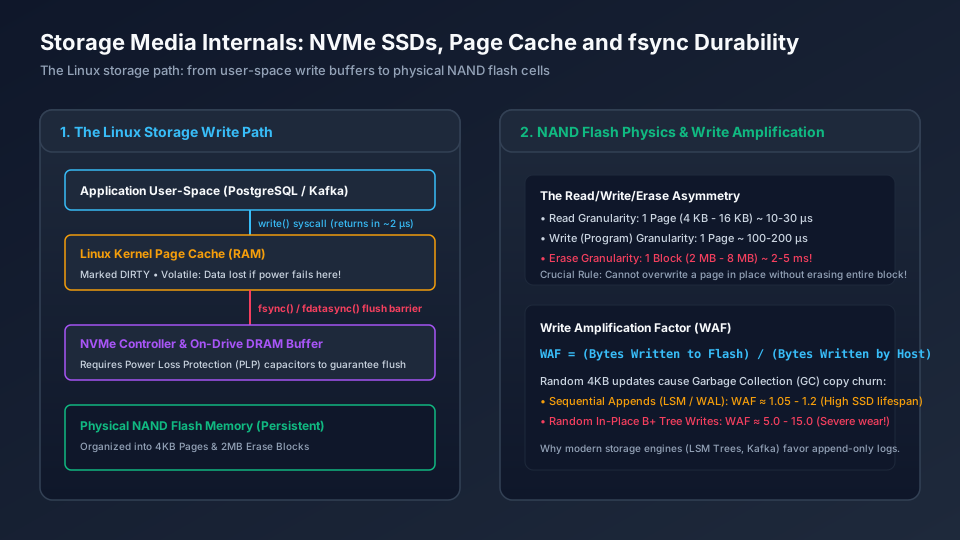
1. Application User-Space (PostgreSQL / Kafka) & Linux Kernel Page Cache (RAM)
Establishes the ingress and structural boundary across Application User-Space (PostgreSQL / Kafka) & Linux Kernel Page Cache (RAM): Marked DIRTY • Volatile: Data lost if power fails here!; Requires Power Loss Protection (PLP) capacitors to guarantee flush; Organized into 4KB Pages & 2MB Erase Blocks.
2. The Read/Write/Erase Asymmetry & Write Amplification Factor (WAF)
Coordinates core data-plane execution and state transitions through The Read/Write/Erase Asymmetry & Write Amplification Factor (WAF): Read Granularity: 1 Page (4 KB - 16 KB) ~ 10-30 µs; Write (Program) Granularity: 1 Page ~ 100-200 µs; Erase Granularity: 1 Block (2 MB - 8 MB) ~ 2-5 ms!.
3. The Read/Write/Erase Asymmetry & Write Amplification Factor (WAF)
Enforces durability, state convergence, and output verification across The Read/Write/Erase Asymmetry & Write Amplification Factor (WAF): Read Granularity: 1 Page (4 KB - 16 KB) ~ 10-30 µs; Write (Program) Granularity: 1 Page ~ 100-200 µs; Erase Granularity: 1 Block (2 MB - 8 MB) ~ 2-5 ms!.
3. Architectural Mechanisms & Concrete Topologies
3.1 The Linux Storage Write Path
A byte travels through four distinct hardware and software boundaries before reaching persistent storage:
[ Application Process ]
       |  write(fd, buf, len)   ~1-2 microseconds
       v
[ Linux Page Cache (DRAM) ]  <--- Marked DIRTY (Volatile!)
       |  fsync() / fdatasync()
       v
[ Block Layer & NVMe Driver ]
       |  NVMe Submission Queue (SQ)
       v
[ On-Drive Controller & DRAM Buffer ] <--- Requires Power Loss Protection (PLP)!
       |  FTL Flash Translation Layer
       v
[ Physical NAND Flash Cells ] <--- Durable (Non-Volatile)
3.2 Linux Dirty Page Flushing Heuristics
Building on the Virtual File System (VFS) and Page Cache path introduced in Step 09 (CORE-M06-001), the Linux kernel’s per-BDI (Backing Device Info) flusher threads ([kworker/u*:*-flush-*], which replaced legacy pdflush; note that kswapd handles free-memory page reclaim under RAM pressure rather than routine dirty-page writeback) manage dirty memory pages via sysctl thresholds:
vm.dirty_background_ratio(default ~10%): When dirty pages exceed this fraction of total RAM, kernel background threads wake up and begin asynchronously writing dirty pages to disk.vm.dirty_ratio(default ~20%): If an application writes faster than the disk can flush, and dirty pages exceed this threshold, the kernel blocks the writing application, forcing it to perform synchronous disk I/O. This causes severe application latency spikes.
4. Formal Mathematical Derivations
4.1 Write Amplification Factor (WAF)
Write Amplification measures the efficiency and flash wear of storage operations:
In a naive model where an application performs random updates of size into a storage system with flash page size and flash erase block size containing pages: If the drive is at utilization (free space fraction ), the expected number of valid pages that must be copied during garbage collection per reclaimed block is:
The garbage collection overhead adds page writes for every free page slots created. The theoretical lower bound on WAF (the MWC model) is:
Engineering Implication:
- If an SSD is 50% full (): . The drive writes 2x the host data.
- If an SSD is 90% full (): . The drive writes 10x the host data!
- If an SSD is 95% full (): . Throughput collapses by 95% and the drive burns out its program-erase (P/E) cycles 20 times faster.
Rule of Thumb: Never run production database SSDs above 70%–80% disk capacity.
5. Edge Cases, Failure Modes & Distributed Anomalies
5.1 The Broken Power Loss Protection (PLP) Disaster
Consumer-grade SSDs and budget cloud drives feature volatile on-drive DRAM write buffers without supercapacitors. When an application calls fsync(), some cheap drives immediately acknowledge the flush before data is written from on-drive DRAM to NAND flash. If a data center power outage strikes, the on-drive DRAM empties instantly, causing silent file corruption that corrupts WAL log chains and invalidates database page checksums upon reboot.
5.2 The fsync Error Reporting Bug (PostgreSQL “fsyncgate”)
Prior to Linux kernel 4.13, when an fsync() failed due to an I/O error (e.g. faulty drive cable or bad block), the kernel cleared the PG_error bit and marked the page as “clean”. When the application retried fsync(), the kernel reported success because the page was no longer marked dirty, even though the data had never been written to physical media! This vulnerability forced major database engines to crash themselves (PANIC) on any fsync error to prevent silent data loss.
6. Open-Source Architectural Studies
6.1 PostgreSQL: Write-Ahead Logging & Checkpointing
PostgreSQL enforces the ARIES write-ahead logging invariant:
- Every table row modification first writes an append-only WAL record into memory.
- Before the client transaction returns
COMMIT, PostgreSQL callsfdatasync()on the WAL file. - The actual data table pages in the buffer pool are modified in RAM and only flushed to disk during asynchronous checkpoints (every 5 to 15 minutes).
Because WAL writes are sequential appends,
fsynclatency on the WAL file is orders of magnitude faster than randomly writing table pages across disk blocks.
6.2 RocksDB: Append-Only SSTables & Direct I/O
RocksDB avoids random write amplification by using a Log-Structured Merge (LSM) Tree:
- All incoming writes append sequentially to an in-memory
MemTableand a WAL log. - When the
MemTablefills (e.g. 64 MB), it is flushed sequentially to an immutableSSTableon disk. - RocksDB supports
use_direct_io_for_flush_and_compaction = true, usingO_DIRECTto bypass the Linux Page Cache entirely, avoiding double-buffering and preserving RAM for the active block cache.
7. Production Incident Post-Mortem (War Stories)
The Friday Night Page Cache Stall
Context: A high-throughput telemetry analytics service was writing 150 MB/s of raw metric data to a Linux server with 128 GB of RAM.
The Incident: Every 45 minutes, the API experienced a catastrophic 12-second latency spike where all HTTP threads stalled, triggering health check timeouts across the load balancer.
The Root Cause: The default Linux sysctl vm.dirty_ratio = 20 meant the kernel allowed dirty pages to accumulate up to before forcing write throttling. When this limit was reached, the kernel froze all user-space write() calls to flush 25 GB of dirty pages to disk at the drive’s 500 MB/s limit ().
The Remediation: Tuned kernel sysctl to flush continuously in small increments:
sysctl -w vm.dirty_background_ratio=3
sysctl -w vm.dirty_ratio=5
By preventing dirty pages from exceeding 4 GB, writeback happened continuously in the background without user-space stalls.
8. Production-Grade TypeScript Simulation: SSD Flash Translation Layer (FTL) & WAF
This simulation models flash memory pages, erase blocks, out-of-place writes, and the garbage collection cleaning process to quantify Write Amplification Factor as a function of drive capacity utilization.
/**
 * Production Storage Simulation: SSD Flash Translation Layer & Write Amplification
 */

export interface Page {
  logicalPageNumber: number;
  valid: boolean;
  data: string;
}

export class EraseBlock {
  public readonly id: number;
  public readonly pageSize: number;
  public pages: (Page | null)[];
  public eraseCount = 0;

  constructor(id: number, pageSize: number) {
    this.id = id;
    this.pageSize = pageSize;
    this.pages = new Array(pageSize).fill(null);
  }

  public getValidPageCount(): number {
    return this.pages.filter((p) => p !== null && p.valid).length;
  }

  public getFreePageCount(): number {
    return this.pages.filter((p) => p === null).length;
  }

  public erase(): void {
    this.pages = new Array(this.pageSize).fill(null);
    this.eraseCount++;
  }
}

export class SSDControllerSimulator {
  private readonly numBlocks: number;
  private readonly pagesPerBlock: number;
  private readonly blocks: EraseBlock[];
  private readonly pageTable = new Map<number, { blockId: number; pageOffset: number }>();

  public hostWrites = 0;
  public flashWrites = 0;

  constructor(numBlocks: number, pagesPerBlock: number) {
    this.numBlocks = numBlocks;
    this.pagesPerBlock = pagesPerBlock;
    this.blocks = [];
    for (let i = 0; i < numBlocks; i++) {
      this.blocks.push(new EraseBlock(i, pagesPerBlock));
    }
  }

  public write(logicalPageNumber: number, data: string): void {
    this.hostWrites++;

    // 1. Invalidate old page if exists (out-of-place write)
    const existing = this.pageTable.get(logicalPageNumber);
    if (existing) {
      const oldBlock = this.blocks[existing.blockId];
      if (oldBlock.pages[existing.pageOffset]) {
        oldBlock.pages[existing.pageOffset]!.valid = false;
      }
    }

    // 2. Find a block with free space
    let targetBlock = this.blocks.find((b) => b.getFreePageCount() > 0);
    if (!targetBlock) {
      // Must perform Garbage Collection (GC)
      this.runGarbageCollection();
      targetBlock = this.blocks.find((b) => b.getFreePageCount() > 0);
      if (!targetBlock) {
        throw new Error("SSD Out of Space! Drive 100% full.");
      }
    }

    // 3. Write into target block
    const freeOffset = targetBlock.pages.findIndex((p) => p === null);
    targetBlock.pages[freeOffset] = { logicalPageNumber, valid: true, data };
    this.pageTable.set(logicalPageNumber, { blockId: targetBlock.id, pageOffset: freeOffset });
    this.flashWrites++;
  }

  private runGarbageCollection(): void {
    // Greedy GC: find block with the FEWEST valid pages (most dirty pages to reclaim)
    let bestBlock: EraseBlock | null = null;
    let minValid = Infinity;

    for (const block of this.blocks) {
      const valid = block.getValidPageCount();
      // Block must have some invalid pages to be worth erasing
      if (valid < block.pageSize && valid < minValid) {
        minValid = valid;
        bestBlock = block;
      }
    }

    if (!bestBlock) return;

    // Relocate valid pages via controller SRAM buffer before erasing victim block
    const validPages = bestBlock.pages.filter((p): p is Page => p !== null && p.valid);
    // Erase the victim block to free physical block capacity
    bestBlock.erase();

    // Re-program valid pages back into flash
    for (const validPage of validPages) {
      const destBlock = this.blocks.find((b) => b.getFreePageCount() > 0);
      if (!destBlock) {
        throw new Error("Garbage collection failed: insufficient free space to relocate");
      }

      const destOffset = destBlock.pages.findIndex((p) => p === null);
      destBlock.pages[destOffset] = { ...validPage };
      this.pageTable.set(validPage.logicalPageNumber, { blockId: destBlock.id, pageOffset: destOffset });
      this.flashWrites++; // GC write overhead!
    }
  }

  public getWriteAmplification(): number {
    return this.hostWrites === 0 ? 1.0 : this.flashWrites / this.hostWrites;
  }
}

// Verification Routine
export function runStorageExperiment() {
  const BLOCKS = 20;
  const PAGES_PER_BLOCK = 16;
  const TOTAL_CAPACITY = BLOCKS * PAGES_PER_BLOCK; // 320 pages
  const WRITE_CYCLES = 1500;

  console.log(`=== SSD Write Amplification Simulation (Capacity: ${TOTAL_CAPACITY} pages) ===`);

  // Test across different utilization levels
  for (const util of [0.5, 0.75, 0.9]) {
    const activeKeys = Math.floor(TOTAL_CAPACITY * util);
    const ssd = new SSDControllerSimulator(BLOCKS, PAGES_PER_BLOCK);

    // Initial fill
    for (let i = 0; i < activeKeys; i++) {
      ssd.write(i, `val-${i}`);
    }

    const initialHostWrites = ssd.hostWrites;
    const initialFlashWrites = ssd.flashWrites;

    // Perform random updates
    for (let i = 0; i < WRITE_CYCLES; i++) {
      const randomKey = Math.floor(Math.random() * activeKeys);
      ssd.write(randomKey, `update-${i}`);
    }

    const testHostWrites = ssd.hostWrites - initialHostWrites;
    const testFlashWrites = ssd.flashWrites - initialFlashWrites;
    const testWAF = testFlashWrites / testHostWrites;

    console.log(
      `Utilization: ${(util * 100).toFixed(0)}% | Host Writes: ${testHostWrites} | ` +
      `Flash Writes: ${testFlashWrites} | WAF: ${testWAF.toFixed(2)}`
    );
  }
}

runStorageExperiment();
9. Operational Checklist, Failure Runbooks & Kernel Tuning
Production Linux Storage Kernel Configuration
Add these settings to /etc/sysctl.d/99-storage.conf for database and Kafka brokers:
# Trigger background flushing at 5% dirty memory
vm.dirty_background_ratio = 5

# Block application writes if dirty memory reaches 10% (prevents multi-gigabyte stalls)
vm.dirty_ratio = 10

# Expire dirty pages after 500 centisecs (5 seconds)
vm.dirty_expire_centisecs = 500
vm.dirty_writeback_centisecs = 100

# Aggressive memory compaction avoidance
vm.swappiness = 1
NVMe Health Inspection Command
Hardware Environment Note:
The nvme-cli diagnostics below require a bare-metal or pass-through Linux server with an attached physical NVMe drive (/dev/nvme0) and administrative privileges. Inside containers, macOS laptops, or virtualized cloud VMs (e.g. standard AWS EBS or GCP Persistent Disks), consult virtual disk metrics via cloud provider telemetry.
# (Requires bare-metal Linux host with NVMe drive and root privileges)
sudo nvme smart-log /dev/nvme0 -o json
Sample SMART Telemetry Output:
{
  "critical_warning": 0,
  "temperature": 314,
  "available_spare": 100,
  "available_spare_threshold": 10,
  "percentage_used": 4,
  "data_units_read": 14205891,
  "data_units_written": 28411782,
  "media_errors": 0,
  "num_err_log_entries": 0
}
Key metrics to alert on in production:
available_spare: Must be (below this threshold, flash reserve blocks are exhausted).percentage_used: Cumulative NAND write endurance wear ().media_errors: Any value indicates unrecoverable NAND page read/write failures.
10. Guided Applied System Design Exercises & Debugging Drills
Drill 1: The fsync IOPS Wall
You have an enterprise NVMe SSD rated for 800,000 random 4 KB write IOPS. Your transactional order processing service issues an fsync() after inserting each individual payment row into PostgreSQL. Benchmark results show your service can only process 1,200 orders per second.
- Explain the mechanical difference between drive controller queue depth (QD=128 for 800k IOPS) and single-threaded synchronous
fsynclatency (QD=1). - Calculate the theoretical maximum transactions per second given an average
fsyncround-trip time of . - Design a Group Commit batching architecture to increase throughput from 1,200 TPS to 50,000 TPS.
Drill 2: Silent Data Loss During Cloud Host Crash
An application issues a write(fd, "OK", 2) call and immediately responds 200 OK to the user. 2 milliseconds later, the hypervisor crashes. After the virtual machine reboots, the file is empty.
- Trace the exact sequence of events that caused the data to be lost.
- Rewrite the write routine using
fdatasync()and explain whyfdatasync()is preferred overfsync()for append-only logs.
View Reference Architecture & Worked Solutions (CORE-M07-001)
Drill 1: The fsync IOPS Wall & Group Commit Architecture
- Queue Depth
QD=128vs. SynchronousQD=1Serialization:- An NVMe SSD achieves its rated only when the host keeps asynchronous I/O requests in flight simultaneously across multiple hardware submission queues (
QD=128), allowing the SSD controller to stripe writes across dozens of internal NAND dies and channels in parallel. - A single-threaded synchronous
fsync()after every row operates atQD=1: transaction cannot issue itsNVME_CMD_FLUSHbarrier until transaction ‘s PCIe + FTL + NAND program cycle completes.
- An NVMe SSD achieves its rated only when the host keeps asynchronous I/O requests in flight simultaneously across multiple hardware submission queues (
- Theoretical Maximum Single-Threaded TPS at per
fsync: (This matches the observed ceiling once of CPU/SQL overhead is included). - Group Commit Batching Design to Reach :
- Designate the first thread entering the commit phase as the Flush Leader (PostgreSQL
WalWriterLock/ RocksDBWriteThreadleader). While the leader’sfdatasync()is in flight (), concurrent worker threads append their serialized WAL records into a shared in-memory WAL ring buffer. - To achieve across , each
fdatasync()batch must coalesce: - Once that single
fdatasync()returns, the leader wakes all 40 waiting transactions simultaneously—achieving while keeping commit latency under .
- Designate the first thread entering the commit phase as the Flush Leader (PostgreSQL
Drill 2: Silent Data Loss Trace & fdatasync() Remediation
- Exact Crash Data-Loss Sequence:
- At ,
write(fd, "OK", 2)copies the 2 bytes from user space into a page inside the guest kernel’s volatile DRAM Page Cache, marks the pagePG_dirty, and returns2in . - The application immediately sends HTTP
200 OKover the network socket. - Because
vm.dirty_expire_centisecsdefaults to () andvm.dirty_background_ratio() was not reached, the per-BDIkworker/flushthread never issued an NVMe write command before the hypervisor crashed at . On reboot, volatile DRAM was wiped and the file remained empty.
- At ,
- Durable Write Routine Using
fdatasync(2):// Pre-allocate WAL segment (e.g., 64 MiB) at file creation so appends do not change st_size posix_fallocate(wal_fd, 0, 64 * 1024 * 1024); // Per-commit durable write path: ssize_t n = pwrite(wal_fd, record_buf, record_len, current_wal_offset); if (n != (ssize_t)record_len) { /* handle error */ } if (fdatasync(wal_fd) != 0) { /* abort commit: never ack 200 OK on flush error! */ } // Only now return 200 OK to client- Why
fdatasync()Beatsfsync()by up to on Pre-Allocated Append Logs:fsync()forces two distinct disk seeks/flushes—one for the data pages and a second for the filesystem inode metadata (mtime,ctime, and file size). When writing into aposix_fallocate()-preallocated WAL segment where file size does not change,fdatasync()flushes only the modified data pages, cutting NVMe flush operations in half while preserving crash durability.
- Why
11. Design Alternatives & Storage Trade-Off Matrix
| Durability Strategy | Primary Guarantees | Write Latency | Flash Write Amplification | Best Architectural Fit |
|---|---|---|---|---|
| Buffered I/O + Periodic fsync | Group-committed durability | 0.5 - 2 ms (Batched flush) | Low to Moderate (Coalesced in DRAM) | Relational DB WAL (PostgreSQL, MySQL InnoDB redo log) |
| fdatasync() per Transaction | Strict per-commit durability | 20 - 150 µs (NVMe FLUSH) | High (Forces controller barrier) | Financial ledgers, ACID coordinator commit logs |
| O_DIRECT + Direct I/O | Bypasses kernel page cache | 15 - 50 µs (Direct DMA) | Minimal OS overhead, direct FTL write | Custom database buffer pools (ScyllaDB, RocksDB DirectIO) |
| Asynchronous Discard / TRIM | Reclaims invalid flash pages | Background task | Reduces Garbage Collection WAF | Long-term NVMe SSD health and sustained random write QPS |
12. Authoritative References & Version Context
- NVM Express, Inc. (2024), “NVM Express Base Specification Revision 2.1” — nvmexpress.org/specifications/
- Michael Mesnier et al. (2014), “Differentiated Storage Services”, ACM SOSP / IEEE Transactions: Flash Translation Layer and durability bounds — doi.org/10.1145/2541940.2541951
- Linux Kernel Documentation — Page Cache Writeback and
vm.dirty_background_ratio— kernel.org/doc/html/latest/admin-guide/sysctl/vm.html - Version Context: NVMe 1.4 / 2.0 specifications on PCIe Gen 4/5 hardware; Linux kernel 6.x block layer, ext4/xfs journaling semantics, and io_uring async fsync (
IORING_OP_FSYNC).